Learn how to navigate the conversation performance in your GenLearn analytics dashboard
Search conversations

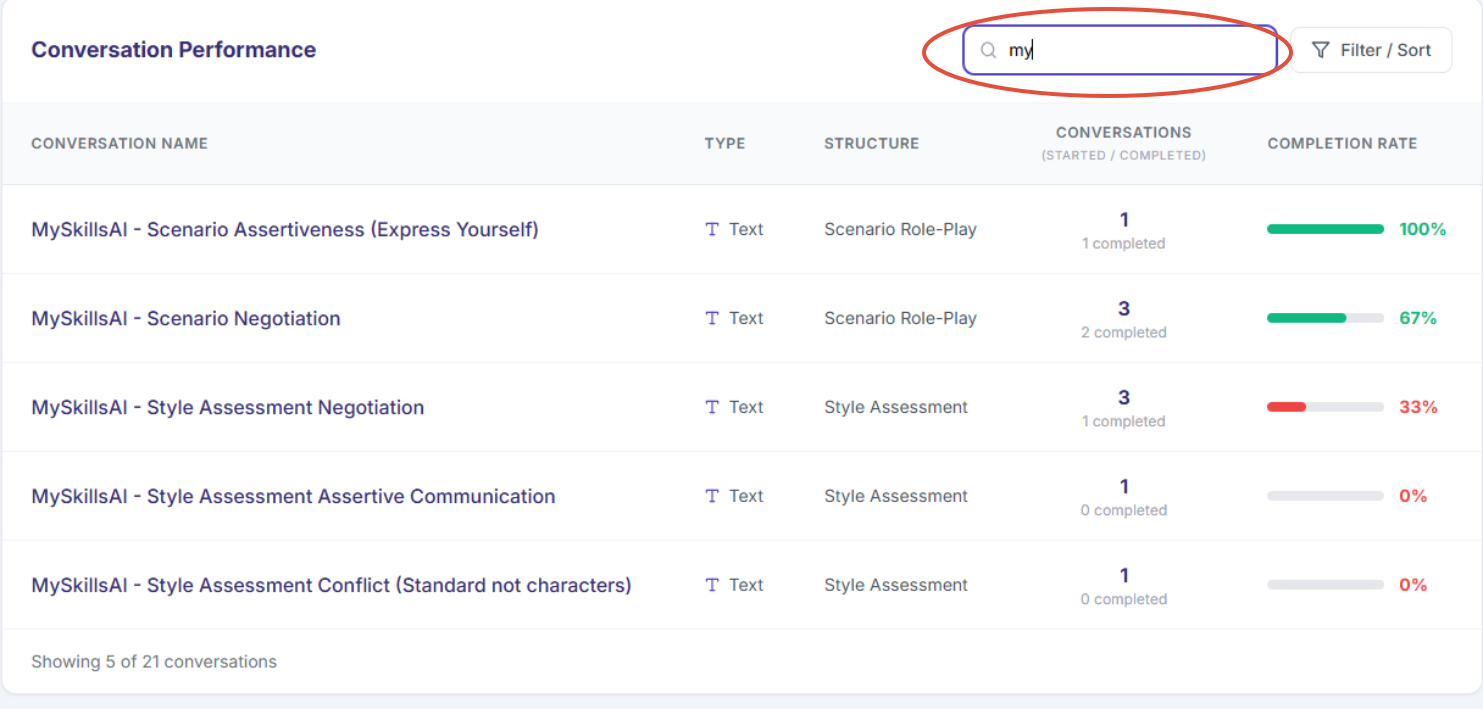
Click into the "search conversations" box and start typing the specific conversation you are trying to find. If you are unsure of the full name of the conversation but know a word or name, you can type this to help narrow down the search.
For example: By searching "my" this has narrowed down the search by only showing conversation with the word "my".
Filter/Sort
- This feature allows you to filter the conversation based on the below options:
Filter by type:
- filter by voice, text or both conversations and;
Sort by:
- Completion rate(highest to lowest) - This option allows you to sort by the the rate of learners who have completed the conversation
- or number completed(highest to lowest - This option allows you to sort by the the number of learners who have completed the conversation
The difference between the two are based on your preferences on how you would prefer the information be displayed
Conversation name
- Name of the conversation created
Type
- Whether the conversation is a Voice or Text conversation
- Conversation(started/completed)
- This shows the number of times the specific conversation has been started(top) or completed(bottom) i.e 2 completed
Completion rate
- This gives you an overall percentage of how many learners have completed the conversation and not just started it.
Was this article helpful?
That’s Great!
Thank you for your feedback
Sorry! We couldn't be helpful
Thank you for your feedback
Feedback sent
We appreciate your effort and will try to fix the article